반응형
예외 처리
CoroutineExceptionHandler
ExceptionHandler는Coroutine내의 코드 실행 중 발생하는Exception을 처리할 수 있는Handler이다.CoroutineExceptionHandler는Coroutine(Job)내부에서 오류가 발생했을 때, 에러를 처리할 수 있는CoroutineContext이다.- 따라서,
CoroutineExceptionHandler를 통해,Exception이 왔을 때, 받은Exception을 출력해준다.
- 위의 코드를 아래와 같이 수정하여 Exception을 Handling 할 수 있다.
GlobalScope.launch(Dispatchers.IO + handler) {    // 1
    launch {
        throw Exception()   // 2
    }
}

val handler = CoroutineExceptionHandler { coroutineScope, exception ->   // 3
    Log.d(TAG, "$exception handled!")
}
launch()의 인자에+ operator로 "handler"를 추가. Exception이 발생하면이 handler로Callback이 전달되어 Exception HandlingException고의적 발생Exception Handling
→ 위의 코드를 실행하면 프로그램은 죽지 않고, 아래와 같은 로그만 나온다
10-26 22:54:16.756 10279 10306 D MainActivity: java.lang.Exception handled!Scope별로ExeceptionHandler를 다르게 둘 수 있기 때문에, 적절히 활용하면 유용하다.
val handler = CoroutineExceptionHandler { context, th->
    println("$context ${th.toString()} ")
}

GlobalScope.launch(handler) {
    val async1 = async(){ 1 }
}GlobalScope가 모든 Exception을 print하는 것을 원치않는다면,CoroutineExceptionHandler를context element로 지정해주면 된다.- 이는
Thread.uncaughtExceptionHandler와 비슷하다.
- 이는
JVM에서 모든Coroutine에 대한Global Exception Handler를 재정의 할 수 있다.- 이는
ServiceLoader에CoroutineExceptionHandler를 등록하면 할 수 있다. Global Exception Handler는Thread.defaultUncaughtExceptionHandler와 비슷하다
- 이는
Android에서는uncaughtExceptionPreHandler가global coroutine exception handler로 등록되어 있고, 이는 더 선행해서 불리는exceptionHandler가 없으면 불리게 된다.
CoroutinExceptionHandler는여러 Job에 붙일수도 있다
suspend fun main() {
    val exceptionHandler = CoroutineExceptionHandler { _, exception ->
        println("CoroutineExceptionHandler : $exception")
    }

    val job1 = CoroutineScope(Dispatchers.IO).launch(exceptionHandler) { // root coroutine, running in GlobalScope
        throw IllegalArgumentException()
    }

    val job2 = CoroutineScope(Dispatchers.IO).launch(exceptionHandler) {
        throw InterruptedException()
    }

    delay(1000)
} /* OUTPUT */
CoroutineExceptionHandler : java.lang.IllegalArgumentException
CoroutineExceptionHandler : java.lang.InterruptedException
Process finished with exit code 0CoroutineExceptionHandler을 이용하여 에러에 맞게 처리
- 위를 응용하여,
when문을 활용해Exception에 대해타입 검사를 통해에러의 유형별로 처리할 수 있도록 만들수도 있다
suspend fun main() {
    val exceptionHandler = CoroutineExceptionHandler { _, exception ->
        println("CoroutineExceptionHandler : $exception")

        when(exception){
            is IllegalArgumentException -> println("More Arguement Needed To Process Job")
            is InterruptedException -> println("Job Interrupted")
        }
    }

    val job1 = CoroutineScope(Dispatchers.IO).launch(exceptionHandler) { // root coroutine, running in GlobalScope
        throw IllegalArgumentException()
    }

    val job2 = CoroutineScope(Dispatchers.IO).launch(exceptionHandler) {
        throw InterruptedException()
    }

    delay(1000)
} /* OUTPUT */
CoroutineExceptionHandler : java.lang.IllegalArgumentException
More Arguement Needed To Process Job
CoroutineExceptionHandler : java.lang.InterruptedException
Job Interrupted
Process finished with exit code 0
- 그러나,
async나withContext를 사용하는 경우는 위의 방법으로는 예외처리가 되지 않는다.
아래와 같이 try-catch 구문으로 Exception Handling
GlobalScope.launch(Dispatchers.IO) {
    try {
        val name = withContext(Dispatchers.Main) {
            throw Exception()
        }
    } catch (e: java.lang.Exception) {
        Log.d(TAG, "$e handled!")
    }
}CoroutineExceptionHandler는 유저가 핸들링하지 않는 exception 들에 대해서만 작동한다.
→ 그래서async builder를 사용하면 영향력이 없다.Coroutine Builder의 2가지 flavor (4편 참고)
→ 자동으로 Exception이 전파되는 것과 유저에 노출되는 것 2가지가 존재하기 때문이다.
main runBlocking Scope에서launch되는Coroutine에Exception Handler를 설치하는 것은 큰 의미가 없다main Coroutine은installed handler에 상관없이child가exception으로 종료될 때 항상 cancel되기 때문이다.- 여러개의
children Coroutine에서Exception을 던지면 어떻게 될까?
→ 일반적인 규칙은“처음 던져진 Exception이 이긴다"이다. 그러나 이경우 exception이 유실될 수 있다.
runBlocking{
	val handler = CoroutineExceptionHandler { _, exception ->
		println(“Caught $exception with suppressed ${exception.suppressed.contentToString()}”)
	}

	val job = GloablScope.launch(handler){
		launch{
			try{
				delay(Long.MAX_VALUE)
			} finally{
				throw ArithmeticException()
			}
		}

		launch{
			delay(100L)
			throw IOException()
		}

		delay(Long.MAX_VALUE)
	}

	job.join()
}

// Caught java.io.IOException with suppressed [java.lang.ArithmeticException]Coroutine 취소
Coroutine의 취소(Cancellation)은 협조적(Cooperative)이다.Coroutine Code는 취소에 협조적이어야 한다.kotlinx.coroutines의 모든suspending function은 취소 가능하다. 라고 표현되어 있다.- 다시 말해,
suspending function은 실행 중 취소 가능한 구간마다 취소요청이 있었는지 확인하고 요청이 있었다면 실행을 즉시 취소하도록 구현되어야 한다. 해당 함수들은coroutine의 취소를 체크하고, 취소가 되었다면, Kotlin은 내부적으로CancellationException을 던진다.- 이
Exception들은 모든Handler에 의해 무시된다 (Crash를 내지 않는다)
그래서 이들은Debug Info로만 사용되며,catch로 잡을수도 있긴 하다.Coroutine이CancellationException이외의Exception을 마주치면, 부모를 exception과 함께 종료시키며 이 동작은 override되어 변경할 수 없고,CoroutineExceptionHandler구현에 의존하지 않는strutured concurrency계층를 제공한다- exception은 모든 children이 terminate된 후에 parent에 의해 처리된다.
CancellationException은 기본적으로 투명하고 wrap되지 않는다.
- 이
runBlocking{
	val handler = CoroutineExceptionHandler { _, exception ->
		println(“Caught original $exception”)
	}

	val job = GlobalScope.launch(handler){
		val inner = launch{
			launch{
				launch{
				   throw IOException()
				}
			}
		}

		try{
			inner.join()
		} catch(e:CancellationException){
			println(“Rethrowing CancellationException with original cause”)
			throw e
		}
	}
	job.join()
}

// Rethrowing CancellationException with original cause
// Caught original java.io.IOExceptioncancel()
- 기본적인 취소는
launch나async메소드로 시작하여 얻은job이나deferred 객체에,cancel()함수 사용 Coroutine의 동작을 멈추는 상태관리 메서드로, 하나의Scope안에 여러Coroutine이 존재하는 경우,하위 Coroutine또한 멈춘다.Coroutine내부의delay()함수 또는yield()함수가 사용된 위치까지 수행된 뒤 종료된다.cancel()로 인해 속성인isActive가false가 되므로, 이를 확인해 수동으로 종료한다Coroutine이 복잡하고 무거운 작업(computation) 을 하고있을 때는cancel에 대해 체크하지 않으면,job.cancel()을 호출해도 작동하지 않는다.
이때 계산하는 코드를 취소시키는 방법은 2가지 접근법이 있다.- 하나는 주기적으로
suspending function을 호출해서 취소를 감지하는 방법이다.→ yield() 함수 - 다른 방법은 명시적으로 취소 상태를 체크하는 것이다.
→isActive는CoroutineScope의Extension Property로Cancel에 대해 확인할 수 있으며,Coroutine안에서 사용할 수 있다.
- 하나는 주기적으로
예시
val job = CoroutineScope(Dispatchers.Default).launch {
            val job1 = launch {
                for (i in 0..10){
                    delay(500)
                    Log.d("코루틴", "$i")
                }
            }
        }

        binding.downloadButton.setOnclickListener{
            job.cancel()
}- 예시 2

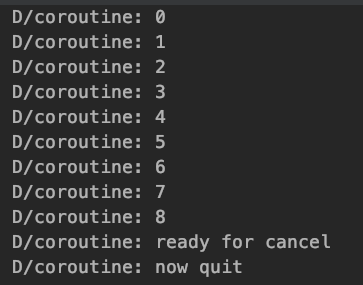
Cancel()에 Cancel된 원인 넣고 원인 출력하기
- 그냥 취소를 해주면 원인을 알 수 없으니, 취소가 된 원인을 인자로 넣어줄 수 있다.
cancel()에 2가지 인자message: String과cause: Throwable을 넘기는 것으로 취소의 원인을 알릴 수 있다.
또한 Job에 getCancellationException() 메소드를 사용함으로써 취소의 원인을 알 수 있게 된다.
suspend fun main() {
    val job = CoroutineScope(Dispatchers.IO).launch {
        delay(1000)
    }

    job.cancel("Job Cancelled by User", InterruptedException("Cancelled Forcibly")) // cacnel 원인 넘기기

    println(job.getCancellationException()) // cancel 원인 출력

    delay(3000)
}/* OUTPUT */
java.util.concurrent.CancellationException: Job Cancelled by User
Process finished with exit code 0→ cancel시 넘겨지는 Exception의 종류는 CancellationException으로 고정된다
→ 위에서는 InterruptedException을 넘겼지만, 출력되는 것은 CacellationException이며cancel시 넘긴 Throwable은 반영되지 않는다.
취소 가능한 Suspending Function이 취소되어 Cancellation Exception이 발생시킨 경우
- 이를 일반적인 예외처리 방식과 동일하게 이를 처리할 수 있다.
- 만약
예외 발생시 해제해야 하는 리소스가 있다면 2가지 방식을 사용할 수 있는데,
(1)try ~ finally구문을 사용하는 방식과
(2)Kotlin.use()함수를 사용하는 방식이 있다.
Closing Resources with Finally
- 취소 가능한
suspending function은CancellationException을 던지며, 해당exception은 보통의 방법으로 다뤄져야한다.
1. Try ~ Catch
fun main() = runBlocking{
    val job = launch {
        try{
            repeat(1000) { i ->
                println("job: I'm sleeping $i ...")
                delay(500L)
            }
        } finally{
            println("job: I'm running finally")
        }
    }
    delay(1300L)
    println("main:I'm tired of waiting!")
    job.cancelAndJoin()
    println("main: Now I can quit")
}

// job: I'm sleeping 0 ...
// job: I'm sleeping 1 ...
// job: I'm sleeping 2 ...
// main: I'm tired of waiting!
// job : I'm running finally"
// main: Now I can quit.join과cancelAndJoin모두finallyaction의 수행을 기다린다.
2. Use 함수
fun main(args: Array<String>) = runBlocking {
    val job = launch {
        SleepingBed().use {
            it.sleep(1000)
        }
    }

    delay(1300L)
    println("main : I'm tired of waiting!")
    job.cancelAndJoin()
    println("main : Now I can quit.")
}

class SleepingBed : Closeable {

    suspend fun sleep(times: Int) {
        repeat(times) { i ->
            println("I'm sleeping $i ...")
            delay(500L)
        }
    }

    override fun close() {
        println("main : I'm running close() in SleepingBed!")
    }
}Run Non-Cancellable Block (취소 불가능한 코드 블럭의 실행)
- 이미
CancellableException이 발생한Coroutine의finally에서suspending function을 호출하는 것은 현재 해당 코드를 수행하는Coroutine은 이미 취소되었기 때문에CancellationException을 야기한다. - 일반적으로 이것은 문제가 아닌데, 왜냐면 제대로된 마무리 동작은 (file 닫기,
job취소,channel닫기 등 보통리소스를 정리하는 함수들) 보통non-blocking이고, 따라서suspending function을 부를 이유도 없기 때문이다. - 하지만 아주 드물게 취소되었을 때, 이미 취소된
Coroutine안에서 동기적으로 어떤suspend function을 호출할 일이 있다면,withContext{ }Coroutine Builder에NonCancellableContext을 전달하여withContext(NonCancellable) { .. }를 사용하면 된다.
fun main() = runBlocking{
    val job = launch {
        try{
            repeat(1000) { i ->
                println("job: I'm sleeping $i ...")
                delay(500L)
            }
        } finally{
            withContext(NonCancellable){
                println("job: I'm running finally")
                delay(1000L)
                println("job: And I've just delayed for 1 sec because I'm non-cancellable")
            }
        }
    }
    delay(1300L)
    println("main:I'm tired of waiting!")
    job.cancelAndJoin()
    println("main: Now I can quit")
}

// job: I'm sleeping 0 ...
// job: I'm sleeping 1 ...
// job: I'm sleeping 2 ...
// main: I'm tired of waiting!
// job : I'm running finally"
// job: And I've just delayed for 1 sec because I'm non-cancellable
// main: Now I can quit.Supervision
- 취소는
전체 CoroutineHierarchy에 전파되며, 양방향의 관계를 가지고 있다.
그러나 한 쪽 방향의 취소가 필요한 경우가 있다. - 이런 요구사항의 좋은 예시는
Scope내에서Job을 가진 UI Component이다. - 만약 UI의 child Task가 실패한다면, 모든 UI Component를 취소 시킬 필요는 없다.
그러나, 해당 UI Component가 Destroy된다면,모든 child job들의 결과는 필요 없으므로 다 취소시키는 것이 맞다. - 다른 예제는 서버 Process로
여러 Child Job을 생성한 경우이며, 그들의 작업을 관리할 필요가 있을 때마이다. 그들이 실패했다면, 실패한모든 Child Job을 재시도 시킬 수 있다.
Supervision Job
- 따라서,
SupervisorJob이 이 목적으로 사용될 수 있다. 일반 Job과 비슷하지만, 취소가 오직 아래방향으로만 전파된다.
fun main() = runBlocking{
    val supervisor = SupervisorJob()
    with(CoroutineScope(coroutineContext + supervisor)){
        // supervisor 가 없었다면 이 exceptionHandler 에 걸리지도 않는다.
        // supervisor 가 있기 떄문에 여기서 exceptionHandler 로 자체처리 해야 crash 가 나지 않는다.
        val firstChild = launch(CoroutineExceptionHandler { _, _ -> }){
            println("First child is failing")
            throw AssertionError("First child is cancelled")
        }

        val secondChild = launch {
            firstChild.join()
            println("First child is cancelled: ${firstChild.isCancelled}, but second one is still active")
            try{
                delay(Long.MAX_VALUE)
            } finally{
                println("Second child is cancelled because supervisor is cancelled")
            }
        }

        firstChild.join()
        println("Cancelling supervisor")
        supervisor.cancel()
        secondChild.join()
    }
}

// First child is failing
// First child is cancelled: true, but second one is still active
// Cancelling supervisor
// Second child is cancelled because supervisor is cancelledSupervision Scope
Scoped 병렬을 위해supervisorScope가coroutineScope대신 사용될 수 있다.- 이 경우 한쪽 방향으로만 취소를 전달한다. 스스로가 취소되었을 때, child들에게 취소를 전달한다.
- 그리고
coroutineScope가 그랬듯 동일하게SupervisionScope도, child의 완료를 기다린다.
fun main() = runBlocking{
    try{
        supervisorScope{
            val child = launch{
                try{
                    println("Child is sleeping")
                    delay(Long.MAX_VALUE)
                } finally{
                    println("Child is cancelled")
                }
            }

            yield()
            println("Throwing exception from scope")
            throw AssertionError()
        }
    } catch(e:AssertionError){
       println("Caught assertion error")
    }
}

// Child is sleeping
// Throwing exception from scope
// Child is cancelled
// Caught assertion errorExceptions in Supervised Coroutines
Supervisor Job과일반 Job의 다른 특별한 특징은 Exception 처리에 있다.- 모든 child는 스스로 Exception을 처리해야 한다.
- → 이 차이는 child의 실패가 parent 로 전파되지 않기 때문이다.
fun main() = runBlocking{
    val handler = CoroutineExceptionHandler { _, exception ->
        println("Caught $exception")
    }

    supervisorScope{
        val child = launch(handler){
            println("Child throws an exception")
            throw AssertionError()
        }
        println("Scope is completing")
    }

    println("Scope is completed")
}

// Scope is completing
// Child throws an exception
// Caught java.lang.AssertionError
// Scope is completed반응형
'IT > Kotlin' 카테고리의 다른 글
| [Kotlin/Coroutine] 7. Coroutine 작성시의 테스트와 디버깅 (0) | 2023.06.19 |
|---|---|
| [Kotlin/Coroutine] 6. Coroutine의 Structured Concurrency(구조화된 동시성) (0) | 2023.05.19 |
| [Kotlin/Coroutine] 4. Coroutine의 구성요소: Coroutine의 생성과 활용 (0) | 2023.04.22 |
| [Kotlin/Coroutine] 3. launch와 async의 Job과 Deferred (0) | 2023.04.07 |
| [Kotlin/Coroutine] 2. Kotlin에서의 Coroutine: launch와 async (0) | 2023.03.24 |